Hardware
HP 544+FLR-QSFP 40 Gb/s 2-Port(s) Ethernet Adapter Card 544+FLR-QSFP 764285-B21
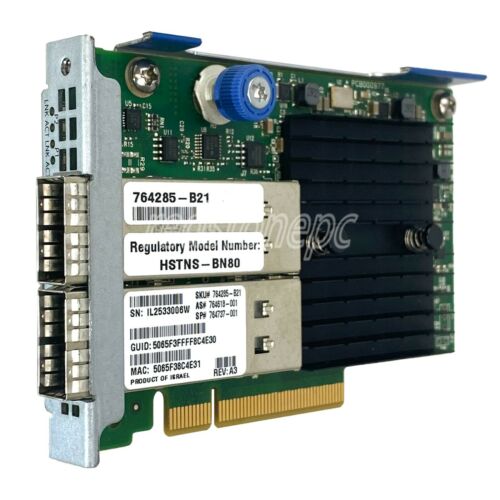
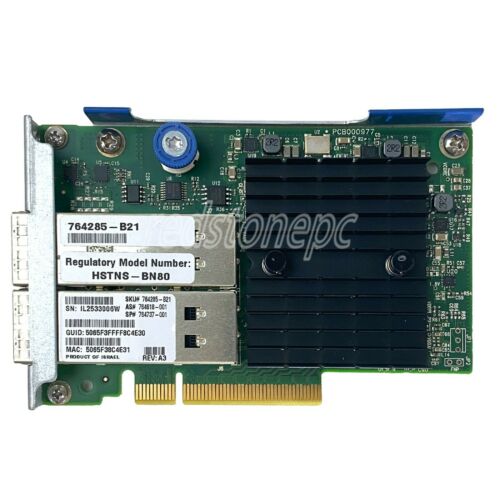
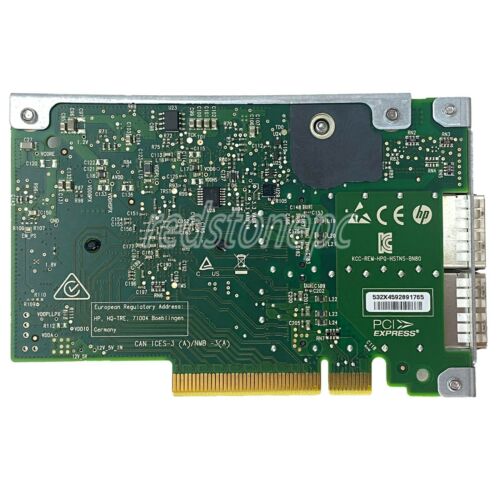
- Number correspondence table
| Number |
Product |
OEM |
| 879482-B21 |
HPE InfiniBand FDR/Ethernet 40Gb/50Gb 2-port 547FLR-QSFP adapter |
Mellanox ConnectX-5 technology |
| 764284-B21 |
HPE InfiniBand FDR/Ethernet 10Gb/40Gb 2-port 544+QSFP adapter |
Mellanox ConnectX-3 Pro technology |
| 764285-B21 |
HPE InfiniBand FDR/Ethernet 10Gb/40Gb 2-port 544+FLR-QSFP adapter |
Mellanox ConnectX-3 Pro technology |
| 764737-001 |
InfiniBand FDR/Ethernet 10Gb/40Gb 2-port 544+FLR-QSFP (FlexibleLOM) adapter - InfiniBand bandwidth up to 56 Gb/s Fourteen Data Rate (FDR), Ethernet bandwidth up to 40 Gb/s, PCIe 3.0 |
Mellanox ConnectX-3 Pro technology |
| 764286-B21 |
HP InfiniBand QDR/Ethernet 10Gb 2-port 544+FLR-QSFP Adapter |
Mellanox ConnectX-3 Pro technology |
Software
MLNX_OFED_LINUX-4.9-4.1.7.0-ubuntu20.04-x86_64.tgz
https://network.nvidia.com/products/infiniband-drivers/linux/mlnx_ofed/
Installation configuration
Compile and install the driver
Note that both the storage side and the connection side need to be installed.
1
2
3
4
5
6
|
tar -zvxf MLNX_OFED_LINUX-4.9-4.1.7.0-ubuntu20.04-x86_64.tgz
cd MLNX_OFED_LINUX-4.9-4.1.7.0-ubuntu20.04-x86_64/
sudo ./mlnxofedinstall --with-nvmf
sudo update-initramfs -u
sudo apt install nvme-cli
reboot
|
Note that both the storage end and the connection end need to be configured. The actual data is not transmitted through IP, but through the IB network and RDMA.
Find the network port
 1
 2
 3
 4
 5
 6
 7
 8
 9
10
11
12
13
14
15
16
17
18
19
20
21
22
23
24
25
26
27
28
29
30
31
32
33
34
35
36
37
38
39
40
41
42
43
44
45
46
47
48
49
50
51
52
53
54
55
56
|
knightli@epyc:~$ sudo lshw -c network
  *-network:0
       description: Ethernet interface
       product: I350 Gigabit Network Connection
       vendor: Intel Corporation
       physical id: 0
       bus info: pci@0000:01:00.0
       logical name: eno1
       version: 01
       serial: ac:1f:6b:e7:e7:b4
       capacity: 1Gbit/s
       width: 32 bits
       clock: 33MHz
       capabilities: pm msi msix pciexpress bus_master cap_list ethernet physical tp 10bt 10bt-fd 100bt 100bt-fd 1000bt-fd autonegotiation
       configuration: autonegotiation=on broadcast=yes driver=igb driverversion=5.6.0-k firmware=1.69, 0x80000df4 latency=0 link=no multicast=yes port=twisted pair
       resources: irq:84 memory:eff20000-eff3ffff ioport:1020(size=32) memory:eff44000-eff47fff memory:1c904000000-1c90401ffff memory:1c904020000-1c90403ffff
  *-network:1
       description: Ethernet interface
       product: I350 Gigabit Network Connection
       vendor: Intel Corporation
       physical id: 0.1
       bus info: pci@0000:01:00.1
       logical name: eno2
       version: 01
       serial: ac:1f:6b:e7:e7:b5
       size: 1Gbit/s
       capacity: 1Gbit/s
       width: 32 bits
       clock: 33MHz
       capabilities: pm msi msix pciexpress bus_master cap_list ethernet physical tp 10bt 10bt-fd 100bt 100bt-fd 1000bt-fd autonegotiation
       configuration: autonegotiation=on broadcast=yes driver=igb driverversion=5.6.0-k duplex=full firmware=1.69, 0x80000df4 ip=192.168.8.161 latency=0 link=yes multicast=yes port=twisted pair speed=1Gbit/s
       resources: irq:98 memory:eff00000-eff1ffff ioport:1000(size=32) memory:eff40000-eff43fff memory:1c904040000-1c90405ffff memory:1c904060000-1c90407ffff
  *-network
       description: interface
       product: MT27520 Family [ConnectX-3 Pro]
       vendor: Mellanox Technologies
       physical id: 0
       bus info: pci@0000:61:00.0
       logical name: ibp97s0
       logical name: /dev/fb0
       version: 00
       serial: a0:00:02:20:fe:80:00:00:00:00:00:00:9c:dc:00:00:00:00:00:00
       width: 64 bits
       clock: 33MHz
       capabilities: pm vpd msix pciexpress bus_master cap_list rom physical fb
       configuration: autonegotiation=on broadcast=yes depth=32 driver=ib_ipoib driverversion=4.9-4.1.7 duplex=full firmware=2.42.5700 ip=172.18.8.2 latency=0 link=yes mode=1024x768 multicast=yes visual=truecolor xres=1024 yres=768
       resources: iomemory:8f0-8ef irq:94 memory:ea500000-ea5fffff memory:8f06000000-8f07ffffff memory:ea400000-ea4fffff
  *-network DISABLED
       description: interface
       physical id: 4
       bus info: pci@0000:61:00.0
       logical name: ibp97s0d1
       serial: a0:00:03:00:fe:80:00:00:00:00:00:00:9c:dc:00:00:00:00:00:00
       size: 10Gbit/s
       capabilities: physical
       configuration: autonegotiation=on broadcast=yes driver=ib_ipoib driverversion=4.9-4.1.7 duplex=full firmware=2.42.5700 link=no multicast=yes speed=10Gbit/s
|
Note that the network port of product: MT27520 Family [ConnectX-3 Pro], the corresponding logical name: ibp97s0
Set the IP of the network port
Modify /etc/netplan/00-installer-config.yaml to add ip address
 1
 2
 3
 4
 5
 6
 7
 8
 9
10
11
12
|
# This is the network config written by 'subiquity'
network:
  ethernets:
    eno1:
      optional: true
      dhcp4: true
    eno2:
      optional: true
      dhcp4: true
    ibp97s0:
      addresses: [172.18.8.2/24]
  version: 2
|
Execute sudo netplan apply after modification
Storage configuration (the physical nvme disk is on this server)
exp_nvme.sh
 1
 2
 3
 4
 5
 6
 7
 8
 9
10
11
12
13
14
15
16
17
18
19
20
21
22
23
24
25
26
|
#!/bin/bash
expdev(){
    echo "exp nvme dev [subsystem] = $1 [nvme dev] = $2 [namespace number]=$3 [ip]=$4 [port]=$5"
    mkdir /sys/kernel/config/nvmet/subsystems/$1/namespaces/$3
    echo -n $2 > /sys/kernel/config/nvmet/subsystems/$1/namespaces/$3/device_path
    echo 1 > /sys/kernel/config/nvmet/subsystems/$1/namespaces/$3/enable
    mkdir /sys/kernel/config/nvmet/ports/$3
    echo $4 > /sys/kernel/config/nvmet/ports/$3/addr_traddr
    echo rdma > /sys/kernel/config/nvmet/ports/$3/addr_trtype
    echo $5 > /sys/kernel/config/nvmet/ports/$3/addr_trsvcid
    echo ipv4 > /sys/kernel/config/nvmet/ports/$3/addr_adrfam
    ln -s /sys/kernel/config/nvmet/subsystems/$1 /sys/kernel/config/nvmet/ports/$3/subsystems/$1
}

modprobe mlx5_core
modprobe nvmet
modprobe nvmet-rdma
modprobe nvme-rdma

mkdir /sys/kernel/config/nvmet/subsystems/data_8
echo 1 > /sys/kernel/config/nvmet/subsystems/data_8/attr_allow_any_host
expdev data_8 /dev/nvme0n1 800 172.18.8.1 6600
expdev data_8 /dev/nvme1n1 801 172.18.8.1 6601
expdev data_8 /dev/nvme2n1 802 172.18.8.1 6602
expdev data_8 /dev/nvme3n1 803 172.18.8.1 6603
expdev data_8 /dev/nvme4n1 804 172.18.8.1 6604
|
Connection configuration (connect to the remote nvme disk from this server)
####Install nvme command line tool
1
|
sudo apt install nvme-cli
|
Execute nvme script
1
2
3
|
modprobe mlx5_core
modprobe nvme-rdma
sudo nvme connect -t rdma -n data_8 -a 172.18.8.1 -s 6601
|
After successful execution, you can use sudo fdisk -l to list the connected nvme devices, and then mount them according to the method of local block devices.