DAPLink Hardware and Firmware
Hardware from https://oshwhub.com/xivn1987/daplink
Firmware comes from https://github.com/XIVN1987/DAPLink/tree/master
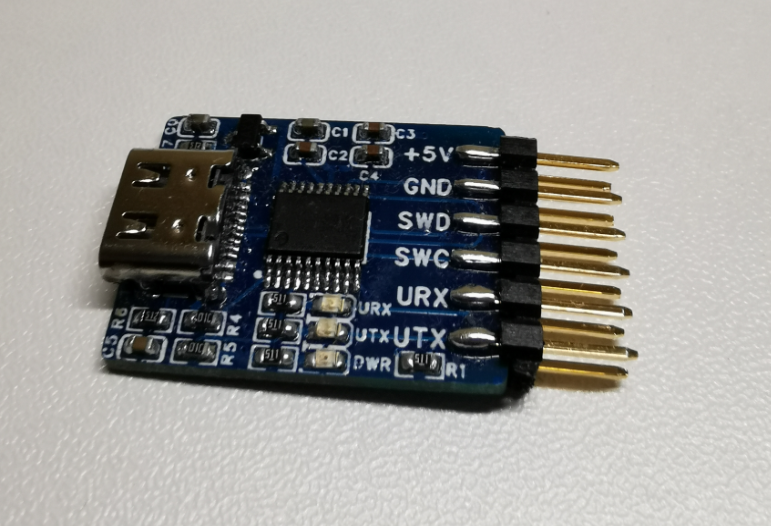
Other unofficial firmware should also have similar problems
Unable to recognize phenomenon description
1
2
3
4
|
$ pyocd list
  #   Probe/Board               Unique ID    Target
-----------------------------------------------------
  0   Segger J-Link (unknown)   4294967295   n/a
|
pyocd is installed normally and other Jlink debuggers can recognize it normally.
1
2
|
$ pyocd list
No available debug probes are connected
|
But the homemade DAPLink cannot be recognized
At the same time, this DAPLink is also used normally in Keil.
Processing
- Check if there is a USB device
1
2
3
4
5
6
|
$ lsusb
Bus 001 Device 001: ID 1d6b:0001 Linux Foundation 1.1 root hub
Bus 001 Device 002: ID 0e0f:0003 VMware, Inc. Virtual Mouse
Bus 001 Device 003: ID 0e0f:0002 VMware, Inc. Virtual USB Hub
Bus 001 Device 007: ID 2e3c:5021 XIVN1987 XV-Link CMSIS-DAP
Bus 002 Device 001: ID 1d6b:0002 Linux Foundation 2.0 root hub
|
You can see that the device is correctly identified XIVN1987 XV-Link CMSIS-DAP
- Add Udev rules
Refer to this URL processing https://github.com/pyocd/pyOCD/tree/main/udev
Download catalog
1
2
3
4
5
6
7
8
|
$ git clone https://github.com/pyocd/pyOCD.git
Cloning into 'pyOCD'...
remote: Enumerating objects: 18824, done.
remote: Counting objects: 100% (507/507), done.
remote: Compressing objects: 100% (166/166), done.
remote: Total 18824 (delta 416), reused 341 (delta 341), pack-reused 18317 (from 3)
Receiving objects: 100% (18824/18824), 29.53 MiB | 9.65 MiB/s, done.
Resolving deltas: 100% (13713/13713), done.
|
The location of the udev rule. The DAPLink of the official firmware can directly use the above file.
 1
 2
 3
 4
 5
 6
 7
 8
 9
10
11
12
13
14
|
cd pyOCD/udev/

$ ll
total 40
drwxrwxr-x  2 knightli knightli 4096 Apr 17 21:26 ./
drwxrwxr-x 11 knightli knightli 4096 Apr 17 21:26 ../
-rwxrwxr-x  1 knightli knightli  540 Apr 17 21:26 49-stlinkv2-1.rules*
-rwxrwxr-x  1 knightli knightli  450 Apr 17 21:26 49-stlinkv2.rules*
-rwxrwxr-x  1 knightli knightli 1007 Apr 17 21:26 49-stlinkv3.rules*
-rw-rw-r--  1 knightli knightli   89 Apr 17 21:26 49-vtlinkii.rules
-rw-rw-r--  1 knightli knightli  699 Apr 17 21:26 49-wch-link.rules
-rw-rw-r--  1 knightli knightli 2836 Apr 17 21:26 50-cmsis-dap.rules
-rw-rw-r--  1 knightli knightli  445 Apr 17 21:26 50-picoprobe.rules
-rwxrwxr-x  1 knightli knightli 1685 Apr 17 21:26 README.md*
|
The self-made version needs to be modified. In fact, you only need to add the following line
1
2
|
# 2e3c:5021 XIVN1987 XV-Link CMSIS-DAP
SUBSYSTEM=="usb", ATTR{idVendor}=="2e3c", ATTR{idProduct}=="5021", MODE:="666"
|
The first line above is a comment
1
2
3
4
5
6
|
$ lsusb
Bus 001 Device 001: ID 1d6b:0001 Linux Foundation 1.1 root hub
Bus 001 Device 002: ID 0e0f:0003 VMware, Inc. Virtual Mouse
Bus 001 Device 003: ID 0e0f:0002 VMware, Inc. Virtual USB Hub
Bus 001 Device 007: ID 2e3c:5021 XIVN1987 XV-Link CMSIS-DAP
Bus 002 Device 001: ID 1d6b:0002 Linux Foundation 2.0 root hub
|
The numbers in the second line correspond to those in lsusb
Copy the corresponding modified files to /etc/udev/rules.d
1
2
|
$ sudo udevadm control --reload
$ sudo udevadm trigger
|
Load modified rules
1
2
3
4
|
$ pyocd list
  #   Probe/Board                  Unique ID      Target
----------------------------------------------------------
  0   XIVN1987 XV-Link CMSIS-DAP   1F75F4F81CA2   n/a
|
After the modification is successful, you will see your DAPLink