This note documents the non-standard backplane connector pinout of the TerraMaster F2-221 NAS. The connector looks close to a PCIe edge connector, but it is not a standard PCIe slot. It is a custom TerraMaster backplane interface.
The connector carries SATA, power, reset, and PCIe signals at the same time. Once PCIe1 x1 is confirmed usable, a custom backplane can expose an M.2 M-key slot and use an NVMe SSD as an internal system drive.
The same idea also applies to the TerraMaster F2-220. Although the F2-220 and F2-221 use different platforms, a fnNAS forum test shows that F3 Backplane V1.1 can detect NVMe on the F2-220, and the NVMe drive is visible inside the OS installer. The extra work is that the old BIOS may not support booting from NVMe.
Summary
The F2-221 backplane connector contains:
- Signals for two native SATA ports
- 12V, 5V, 3.3V, and GND
- SATA drive power-control related signals
PERST#- At least one usable PCIe Gen2 x1 signal group
- Partial clues for a second PCIe signal group, but not fully verified
PCIe1 can be used to expose an M.2 M-key NVMe slot. In testing, the NVMe drive runs at PCIe Gen2 x1, and the BIOS can detect and boot from it.
F2-220 testing points in the same direction: the hardware can detect NVMe, but the BIOS boot stage may require injecting an NVMe module, and the boot entry may appear as PATA.
Backplane Connector Pinout
The connector has B/A sides. ? means unknown or unconnected, and NC means not connected.
| Pin | B side | A side |
|---|---|---|
| 1 | 12V | ? |
| 2 | 12V | 12V |
| 3 | 12V | 12V |
| 4 | GND | GND |
| 5 | SATA1 A+ | SATA1 B+ |
| 6 | SATA1 A- | SATA1 B- |
| 7 | GND | NC |
| 8 | 5V | 5V |
| 9 | 5V | 5V |
| 10 | ? | 5V |
| 11 | ? | ? |
| 12 | 3.3V | GND |
| 13 | GND | 3.3V |
| 14 | SATA2 A+ | 3.3V |
| 15 | SATA2 A- | GND |
| 16 | GND | SATA2 B+ |
| 17 | PERST# | SATA2 B- |
| 18 | GND | GND |
| 19 | PCIe1 TX+ | NC |
| 20 | PCIe1 TX- | GND |
| 21 | GND | PCIe1 RX+ |
| 22 | GND | PCIe1 RX- |
| 23 | PCIe1 REFCLK+ | GND |
| 24 | PCIe1 REFCLK- | GND |
| 25 | GND | PCIe2 RX+ |
| 26 | GND | PCIe2 RX- |
| 27 | PCIe2 TX+ | GND |
| 28 | PCIe2 TX- | GND |
| 29 | GND | PCIe2 REFCLK+ |
| 30 | ? | PCIe2 REFCLK- |
| 31 | ? | GND |
| 32 | GND | ? |
PCIe1 has higher practical reference value. PCIe2 is not fully verified and should only be treated as a clue, not a reliable design basis.
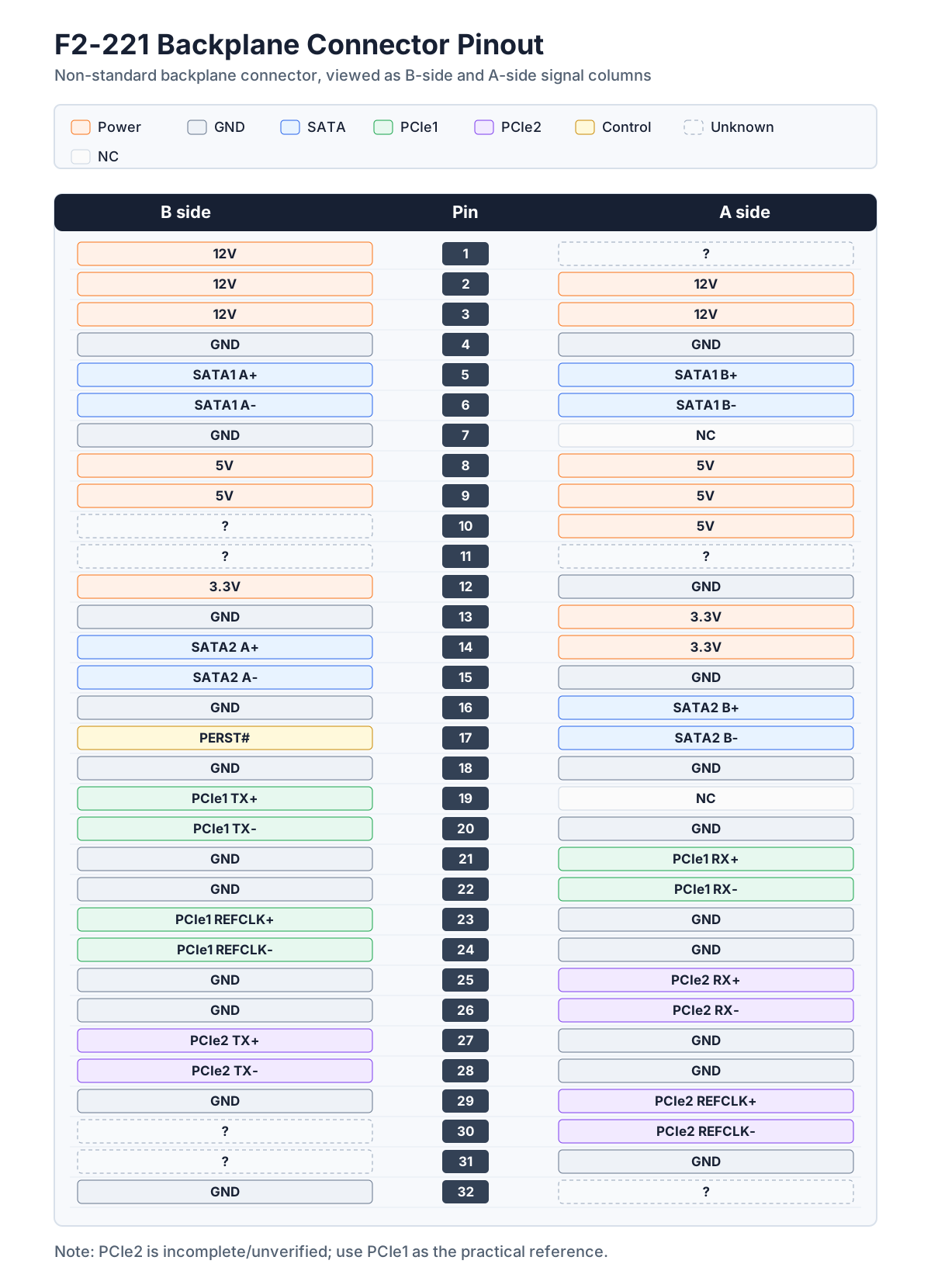
Signal Source Reasoning
The stock F2-221 dual-bay backplane does not include a PCIe-to-SATA controller. SATA signals go directly from the motherboard connector into the backplane. The extra PCIe signals are mainly inferred from other multi-bay models in the same product family.
The TerraMaster F5-422 backplane uses two ASMedia ASM1061 chips. ASM1061 is a PCIe Gen2 x1 to dual-SATA controller. Combined with the Intel J3355 having 2 SATA ports and 6 PCIe Gen2 lanes, this suggests that multi-bay models expand SATA ports through PCIe.
Therefore, it is reasonable for the F2-221 motherboard connector to retain PCIe signals. The vendor likely reuses motherboard designs across models with different bay counts and changes functionality through the backplane.
PCIe Differential Pair Identification
PCIe differential pairs often go into inner layers after vias, so photos alone cannot trace the complete routing. One useful rule is that, in traditional PCIe designs, TX differential pairs usually have AC coupling capacitors.
The direction must be viewed in reverse:
TXfrom theASM1061controller’s perspective corresponds toRXon the CPU or motherboard side.RXfrom theASM1061controller’s perspective corresponds toTXon the CPU or motherboard side.REFCLKneeds to be judged together with neighboring differential pairs and routing location.
This kind of pinout is better treated as hardware reverse-engineering material, not as an official specification.
Validation
F3 Backplane designs based on this pinout have completed the following validation:
- The original two SATA drive bays remain usable.
- PCIe1 can be routed to an M.2 M-key slot.
- The NVMe SSD can be detected by BIOS.
- The NAS can boot directly from the NVMe SSD.
btrfs scrubfound no disk errors.- The system ran from the NVMe SSD for weeks without obvious issues.
The test NVMe SSD was a Patriot P300 128GB. hdparm result:
|
|
This speed matches the PCIe Gen2 x1 limitation. The goal is not to fully utilize NVMe performance, but to replace an external USB SSD with an internal system drive.
Notes
This pinout is useful as a reference for hardware reverse engineering and custom backplanes, but it should not be treated as official documentation.
- The connector is not standard PCIe and cannot directly accept generic PCIe devices.
?pins are unverified and should not be connected to critical circuits casually.- PCIe2 is not fully verified and carries higher risk than PCIe1.
CLKREQis not fully routed like a normal M.2 design, so ASPM may not work.- SATA power includes hot-swap related load switch and slow start logic; do not route only signal lines while ignoring power control.
- If reproducing the design, measure your own motherboard and backplane again instead of relying only on photos.
Related Links
- Original project write-up: I made a new backplane for my Terramaster F2-221 NAS
- F3 Backplane KiCad project: arnarg/f3_backplane
- F3 Backplane pinout CSV: f3_backplane.csv
- F2-220 compatibility test: 铁威马F2-220折腾飞牛OS过程