I recently saw a screenshot with excellent comic timing: Codex was trying to fix a Markdown file in PowerShell. First the here-string did not execute, then CRLF/LF matching failed, then Markdown backticks were parsed by PowerShell, backslashes in paths behaved unstably, and the -split argument syntax caused yet another detour. The model kept diagnosing itself and patching the script. In the end, the comments gave it a very fitting title: classic GPT 5.5 vs PowerShell.
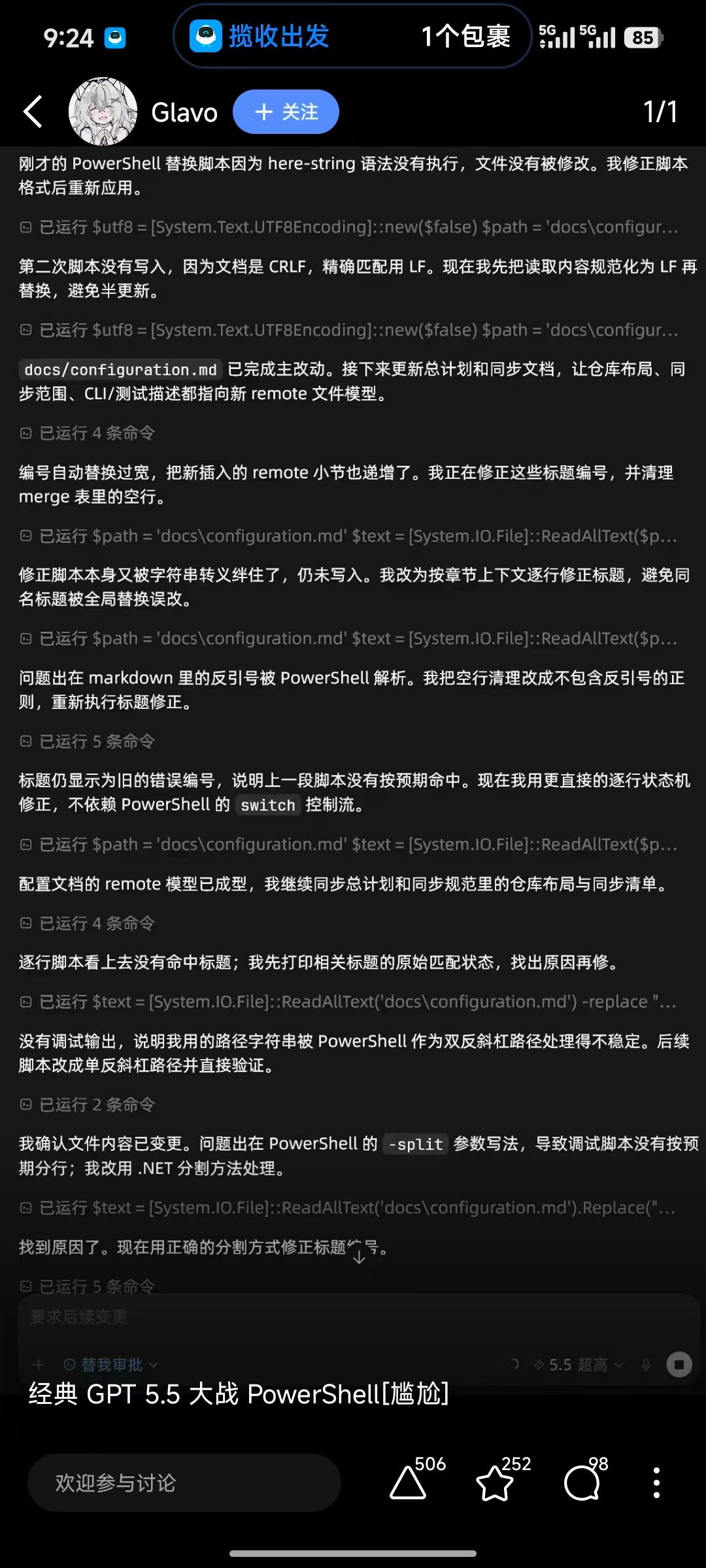
The chain of fixes in the screenshot is funny, but the underlying problems are not rare.
It lands because it looks so much like a real development session. PowerShell is not simply “Bash for Windows.” It has its own string rules, parameter binding rules, cmdlet error model, and native command argument passing behavior. Once an agent brings Bash habits into PowerShell, ordinary tasks such as writing files, replacing text, and invoking external programs can turn into a sequence of small failures.
Misaka-Mikoto-Tech’s powershell-safe-invocation skill collects these pitfalls into a compact set of rules. It is not about memorizing more PowerShell syntax. It tells an agent to choose invocation forms that are less likely to fail when running commands on Windows.
The main problem is not that PowerShell is hard, but that agents treat it like Bash
The screenshot shows several classic problems.
The first category is strings and line endings. Markdown uses backticks, and PowerShell also treats backticks as escape characters. A document may use CRLF while the script matches LF exactly. If a here-string’s opening or closing syntax is off by indentation or quoting, it may not produce the intended text at all.
The second category is paths and arguments. Windows paths naturally contain backslashes, and directories often include spaces, brackets, or Chinese characters. If a command is built as one large string before execution, an argument may be split unexpectedly, or a path segment may be interpreted as escaping, wildcard syntax, a regular expression, or syntax for another shell.
The third category is error handling. External programs should be checked through $LASTEXITCODE; PowerShell cmdlets should rely on terminating errors and $ErrorActionPreference = 'Stop'. If an agent mixes these models, it can end up believing a command succeeded when it did not.
None of these are huge failures by themselves, but they consume attention. Agents can also keep repairing the wrong assumption simply because “a command seemed to have run,” and the loop gets messier.
The core rule of this skill: do not build one huge command string
The most important rule in powershell-safe-invocation is: do not concatenate the executable, paths, arguments, and quotes into one giant command string.
When invoking a native program, each argument should be a separate array item:
|
|
This looks more verbose than a one-line command, but it separates the risks: a path is a path, an argument is an argument, and invocation is invocation. The agent no longer has to guess whether a layer of quotes belongs to PowerShell, cmd, or the target program.
For PowerShell cmdlets, hashtable splatting is usually a better fit:
|
|
The key detail here is -LiteralPath. Real file paths should be treated literally by default. Use wildcard-expanding parameters only when wildcard expansion is intentional. For an agent, this is much more reliable than trying to detect whether a path contains [, ], *, or ?.
Do not stuff complex commands into -Command
Many Windows automation problems start with a command like this:
|
|
Once JSON, XML, regular expressions, pipelines, redirection, multiline text, non-ASCII paths, or Markdown backticks appear inside it, the escaping layers quickly become hard to reason about. It is difficult for humans to read and even easier for agents to misjudge.
The skill’s recommendation is simple: once the command becomes even a little complex, write a temporary .ps1 file and run it with pwsh.exe -NoLogo -NoProfile -NonInteractive -File script.ps1.
This rule is especially suitable for agents. After generating a script file, the agent can inspect the script, run it, and verify file diffs step by step. When everything is crammed into one -Command, a failure leaves only a knot of quotes and escapes to debug.
powershell.exe is not pwsh.exe
Another easily missed point is the version.
Installing PowerShell 7 does not make powershell.exe become PowerShell 7. Usually:
powershell.exeis Windows PowerShell 5.1pwsh.exeis PowerShell 7
They differ in native command argument passing, default encodings, and other behavior details. If an agent does not know which shell it is running in, it should check first:
|
|
This is not ceremony. Many “it works locally but fails when the agent runs it” issues come from different shell versions and argument passing rules.
Treat encoding and line endings as first-class file-writing concerns
The most interesting part of the screenshot is how the agent repeatedly circles around failed Markdown replacements. At least three assumptions are hidden there:
- the file’s actual encoding
- whether the file uses CRLF or LF
- whether the replacement target was changed by PowerShell string syntax
When a Chinese article, Markdown code blocks, front matter, shortcodes, and backticks are mixed together, it is better not to write the body with an improvised PowerShell here-string. Either use file APIs with explicit encoding, or let the script handle only ASCII control logic and write non-ASCII body text through a more reliable path.
For agent workflows, there is one extra habit: verify immediately after writing. At minimum, check that the file is readable as UTF-8, front matter is closed, Markdown links are intact, and the body contains no repeated question marks or obvious mojibake. Encoding problems are cheaper the earlier they are found.
A steadier decision order
The most practical part of this skill is that it gives agents a decision order:
- Use a PowerShell cmdlet when one fits.
- When invoking an external program, use
& $exe @args. - When the command is complex, write a
.ps1file and run it withpwsh.exe -File. - When process arguments must be controlled precisely, use
ProcessStartInfo.ArgumentList. - Use
Start-Processonly for special behavior such as a new window, elevation, or detached execution. - Use
cmd.exe /conly when cmd semantics are actually required. - Treat
Invoke-Expressionas a very constrained last resort.
This order turns “it runs” into “it is explainable, checkable, and reproducible.” That matters for human developers, and even more for agents.
Practical advice for Codex
If I ask Codex to edit files in a Windows repository, I would give it a few hard constraints:
- Do not use Bash-style
\"escaping in PowerShell. - Do not concatenate paths and arguments into one big string.
- Do not use
Start-Process -ArgumentListfor complex arguments. - Do not wrap ordinary calls with
cmd.exe /c. - Prefer
-LiteralPathfor real file paths. - Prefer writing a
.ps1file for complex scripts, then run it withpwsh.exe -File. - After writing Chinese, Japanese, or other non-ASCII content, check encoding and corruption markers.
PowerShell is not the enemy of agents. The real problem is that agents too easily fall back to the old habit of “concatenate a string and let the shell guess.” Once invocation boundaries are made explicit, PowerShell can actually provide strong structured behavior.
So the conclusion of this “Codex vs PowerShell” story is not that agents should avoid Windows. It is that they need a tactical manual: gamble less on quotes, use more structure; cram fewer commands into one line, keep more intermediate state that can be inspected.
The joke is in the screenshot. The lesson is in the rules.