Classification
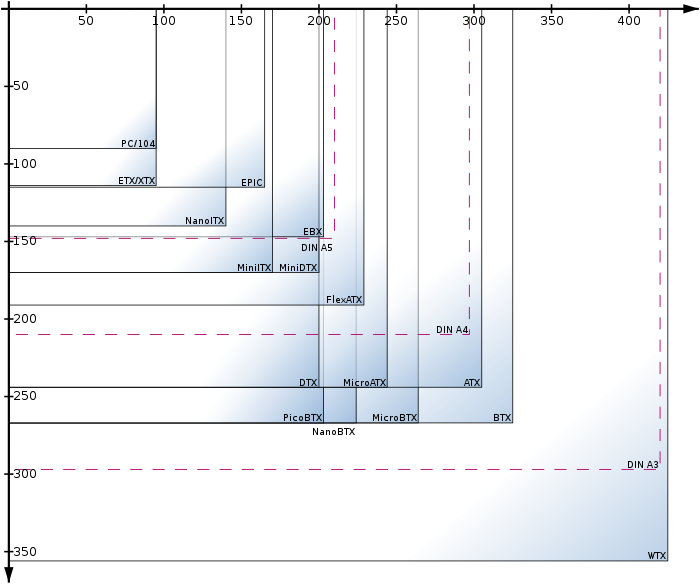
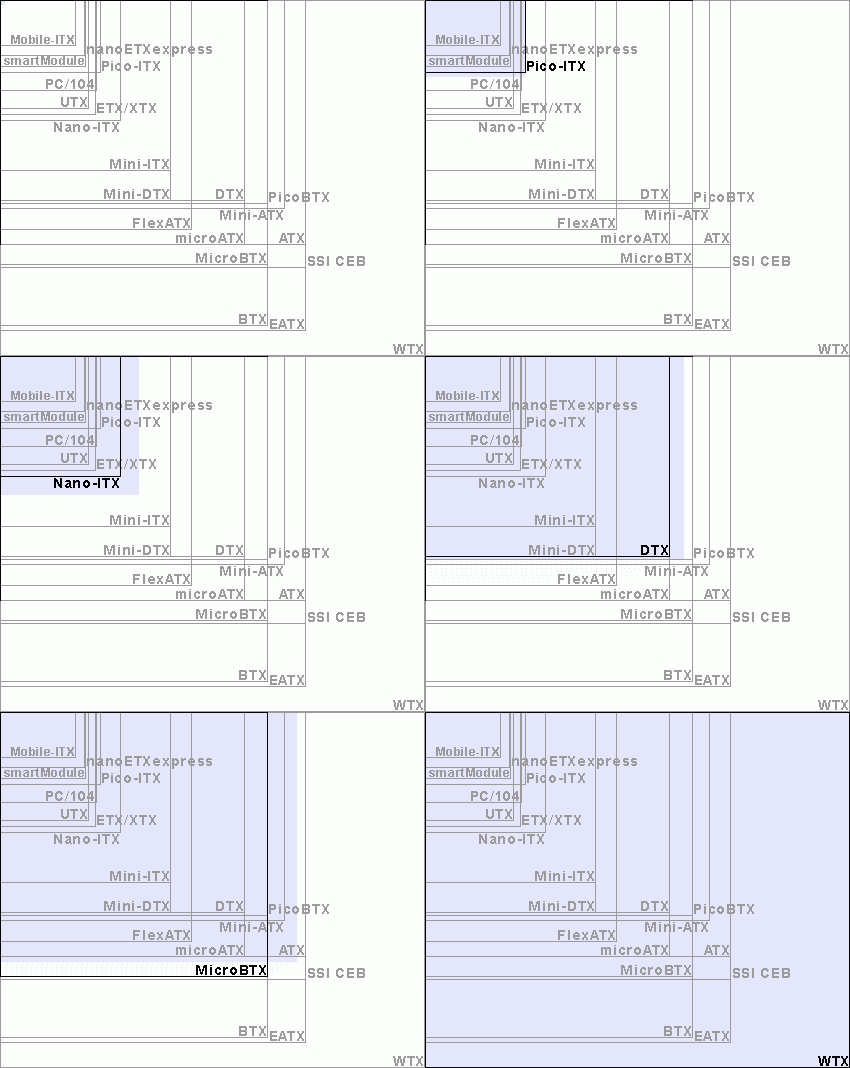
| Specifications | Origin | Maximum size | Introduction |
|---|---|---|---|
| AT | IBM 1984 | 12 × 11"–13" 305 × 279–330 mm | Obsolete - See ISA. IBM created this specification in order to produce the IBM PC/AT, a machine using the Intel 80286. Also known as Full AT, it was popular in the Intel 80386 era and is now replaced by ATX |
| Baby-AT | ? | 8.5" × 10"–13" 216 mm × 254-330 mm | IBM launched in 1985 with the goal of replacing AT motherboards. It has the same functions as AT but smaller size, so it is very popular |
| ATX | Intel 1996 12" × 9.6" 305 mm × 244 mm | Published by Intel in 1995. As of 2014, it is still the most popular specification among DIY people | |
| MicroATX | 1996 | 9.6" × 9.6" 244 mm × 244 mm | Smaller version of ATX (25% shorter). It can be installed in most ATX chassis, but the number of expansion slots is less than that of ATX. It is also the most popular specification among DIY groups |
| Mini ATX | ? | 11.2" × 8.2" 284 mm × 208 mm | |
| FlexATX | Intel 1999 | 9.0" | |
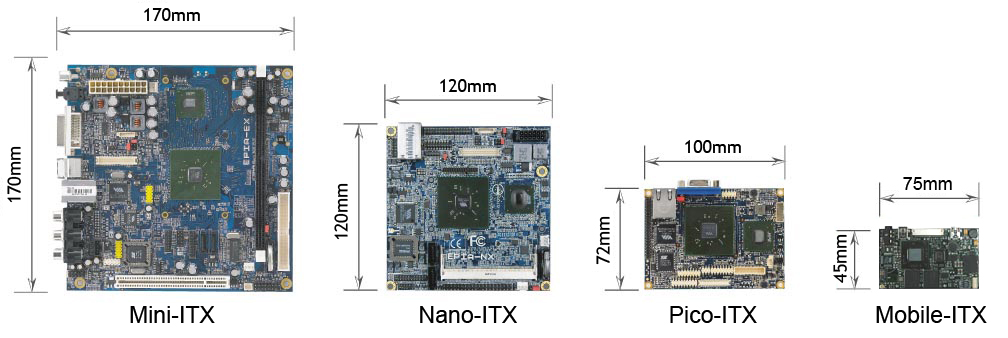
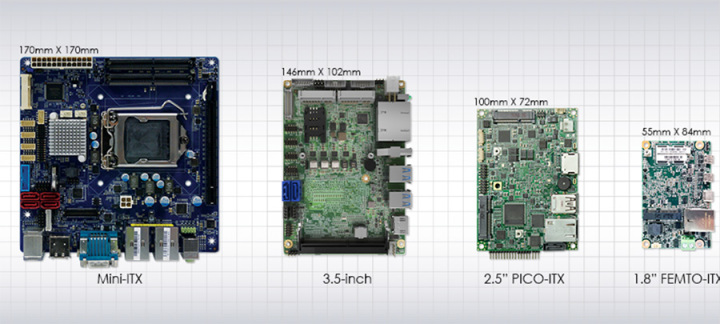
| Mini-ITX | VIA Electronics 2001 | 6.7" × 6.7" 170 mm × 170 mm max. | Smaller and more integrated than MicroATX, mostly used in small devices, such as thin clients and digital video conversion boxes |
| Nano-ITX | VIA Electronics 2003 | 4.7" × 4.7" 120 mm × 120 mm | |
| Pico-ITX | VIA Electronics 2007 | 100 mm × 72 mm max. | |
| Mobile-ITX | VIA Electronics 2007 | 2.953" × 1.772" 75 mm × 45 mm | |
| BTX | Intel 2004 | 12.8" × 10.5" 325 mm × 267 mm max. | A new specification introduced by Intel in the early 2000s, but was unsuccessful. Now only used for brand-name computers |
| MicroBTX | Intel 2004 | 10.4" × 10.5" 264 mm × 267 mm max. | |
| PicoBTX | Intel 2004 | 8.0" × 10.5" 203 mm × 267 mm max. | |
| DTX | AMD 2007 | 200 mm × 244 mm max. | |
| Mini-DTX | AMD 2007 | 200 mm × 170 mm max. | |
| ETX | Kontron | 95 x 114 mm | For embedded systems and single board computers, baseboard required |
| Extended ATX | ? | 12" × 13" 305mm × 330 mm | For Rackmount server systems. Typically used on server-grade motherboards where dual processors and standard ATX are circuitously incompetent. The fixing screw positions in the upper part are the same as those of ATX |
| LPX | |||
| Mini-LPX | ? | 8"–9" × 10"–11" 203–229 mm × 254–279 mm | For lightweight computers |
| PC/104 | PC/104 Consortium 1992 | 3.8" × 3.6" | For embedded systems |
| PC104plus | PC/104 Consortium 1997 | 3.8" × 3.6" | For embedded systems |
| NLX | Intel 1999 | 8"–9" × 10"-13.6" 203–229 mm × 254–345 mm | For low-profile computers, released in 1997. If you want to use an expansion slot, you must also add riser |
| WTX | Intel 1998 | 14" × 16.75" 355.6 mm × 425.4 mm | For high-end workstations and servers with multiple processors and multiple hard drives |
| XTX | 2005 | 95 x 114 mm | for embedded systems |
| NUC | Intel 2012 | 100 mm × 100 mm | The ideal engine to power digital signage, multimedia kiosks, home theater systems and a variety of smart devices |
Some comparison pictures
References
http://gigabytedailycht.blogspot.com/2013/07/blog-post_24.html https://zh.wikipedia.org/wiki/%E4%B8%BB%E6%A9%9F%E6%9D%BF%E8%A6%8F%E6%A0%BC%E6%AF%94%E8%BC%83 https://zhuanlan.zhihu.com/p/468200298
When choosing a case or designing a mounting plate, do not rely only on the board name. Check the actual width, depth, I/O shield position, expansion-slot alignment, and screw-hole positions. Some vendor boards are close to a common standard but still need custom standoffs or cable clearance.